
Accountants: forget more AI tools. Hand off three jobs.
If figuring out AI feels like a second job, you're not behind. You just started at the wrong end: the tool instead of the job.
By Robb Lejuwaan, Bluhook. Published September 24, 2026. In the Basics track.
Contents
- Figuring out AI has turned into a second job
- Why more tools make it worse
- Start with the job, not the tool
- Jobs likely to make the cut in an accounting firm
- What one job looks like, start to finish
- Tell your team what this is, and what it isn't
- The easiest way to start this week
- Where it gets hard
- If you'd rather not figure it out alone
TL;DR
Most CPAs in one yearly survey said AI will help their firm long term, but will add to their stress in the short run. The fix is picking three jobs your team does every week, handing them to AI one at a time, and keeping a person on the review. This shows you how to find those three jobs this week, with a prompt you can copy, and where it gets hard enough that you'd want help.
Okay, so you've got five new AI logins, nobody's sure what client info is allowed in which one, and the work still gets done exactly like it did last year. Sound familiar?
It usually goes like this. The owner tries ChatGPT. Somebody on the team signs up for an AI note taker. The practice software adds an AI button nobody asked for. Then there's a webinar about AI bookkeeping and a vendor email about AI tax research, and six months later you're paying for all of it.
You didn't screw up. You just started with the tools, and everybody does.
Figuring out AI has turned into a second job
You're not imagining this. Randy Crabtree is a CPA whose firm runs a yearly survey of CPAs. This time it asked about AI. Most said it would help their firm long term. Most also said it would add to their stress and burnout in the short run. Separate research his firm worked on found about 71% feel overwhelmed by AI.
Accountants aren't the only ones, either. Somebody on Reddit's small business forum posted "Is anyone else completely fed up with this new AI software?" It got over 300 upvotes. The top reply said the person didn't need enterprise software at all, and that a $20 a month AI subscription could handle it.
That guy gets it, and that's pretty much the whole point of this article.
- Is AI contributing to burnout? (CPA Trendlines, on the CPA career satisfaction survey)
- "Is anyone else completely fed up with this new AI software?" (r/smallbusiness)
Why more tools make it worse
Every tool you add comes with homework. Somebody has to learn it, somebody has to decide what client information is allowed in it, and somebody has to check what it spits out. And when busy season hits, the tool nobody fully learned is the first thing everybody quietly stops using.
In September, a British business owner posted a sponsored Xero partner ad on Instagram saying she'd hooked Claude up to Xero and stopped paying her accountant £800 a month for management accounts. Xero pulled it and apologized.
Accountants were mad, and they had a point, because a tool doesn't replace judgment. But the post got one thing right: some of the work your firm does every month can be handed to AI. You just gotta know which work.
Stop shopping. Figure out what your team does every Tuesday first.
- Xero apologises after sponsored post told SMBs to replace accountants with AI (OnTargetish, September 2026)
Start with the job, not the tool
So flip it around. Forget which AI to buy. Ask one question instead: what does my team do every single week that follows the same steps every time?
A good first job for AI has four things going for it:
- It repeats, weekly or more.
- It follows the same steps every time.
- A person already looks at the result before it goes out.
- If it's wrong, you catch it before a client does.
That last one matters most. You're not handing AI the judgment calls. You're handing it the first draft, and your people keep the final say. Same way you'd treat a new hire in their first month.
Jobs likely to make the cut in an accounting firm
Here's where most firms could find their first three. Not every one fits every firm, and that's kind of the point. Yours might look different.
| The job | What AI does | What your team still does |
|---|---|---|
| Chasing clients for missing documents (W-2s in February, bank statements and receipts every month) | What AI does:Drafts the reminder emails and keeps the list of who's still missing what | What your team still does:Sends them, and handles the client who calls upset |
| Explaining a notice or letter to a client | What AI does:Writes a plain-English first draft | What your team still does:Checks it's right for that client and signs off |
| Meeting notes | What AI does:Turns a call recording or rough notes into a summary with next steps | What your team still does:Confirms the next steps and assigns them |
| Onboarding checklists and welcome emails | What AI does:Fills in your template from the new client's details | What your team still does:Reviews it and sends it |
| The inbox in busy season | What AI does:Tags what's urgent, what's a document and what's a question | What your team still does:Answers the questions |
Notice what's not on that list: preparing the return, making the call on a tricky deduction, anything where the answer depends on judgment. That's your job, and it's what clients pay you for.
What one job looks like, start to finish
Take the first one, chasing missing documents, because every firm does it and everybody hates it.
Right now it probably goes like this. Somebody opens the client list, checks who's sent what, writes an email to everyone who hasn't, and then does the whole thing again two weeks later. Maybe it lives in a spreadsheet. Maybe it lives on sticky notes on somebody's monitor. (No judgment. Every small business I know runs something on sticky notes.)
If your client portal already sends automatic reminders, good. AI's job here is the part the portal can't write: the specific, friendly nudge that names exactly what's missing and why it matters. With AI in the loop, the same person does this instead:
- Paste in the list of what's missing, with names and anything else that identifies the client, like employer or bank names, swapped out for Client 1, Client 2 and so on. The AI doesn't need to know who anybody is.
- Ask it for a short, friendly reminder for each one, in your firm's tone, naming the exact documents still missing.
- Read each draft, fix anything that's off, put the name back in, and send it yourself.
- Two weeks later, paste the updated list and ask for a firmer second reminder.
The AI never sees a return. It never sends anything on its own. It just writes the emails nobody wants to write. And the first time you do it, save the instructions you gave it, so next time it's one paste instead of explaining the whole thing again. Basically, you never start from a blank email again.
If you prepare returns, there are IRS rules (Section 7216) about using client tax information, and some uses need the client's written consent. Don't put tax return information into any AI tool until you've checked. I'm covering that one next.
Tell your team what this is, and what it isn't
One more thing before you start. Somebody on your team is gonna hear "AI" and think "my job's next." Say it out loud: this is about the work nobody wants, the reminder emails and the meeting notes, so they get more time for the work that needs a person.
Then let the person who does the task every week be the one who tests it. They know where it goes wrong. They'll spot a bad draft in two seconds, and they'll trust the thing a lot more if they helped set it up.
The easiest way to start this week
You don't need to buy anything new for this part. Here's the whole thing:
- For one week, have everyone on the team keep a plain list of every task they did more than once. Don't judge it, just write it down.
- At the end of the week, put the lists together and cross off anything that needs a judgment call.
- From what's left, circle the three that eat the most hours.
- Pick one. Just one. Try it with the AI your firm already has. If you're on Microsoft 365 with Copilot, start there. If not, a business plan of ChatGPT or Claude, with training on your data turned off, is plenty to start, as long as it's not somebody's personal account.
- Run it for two weeks with a person checking every single result. If it holds up, move on to the second job.
Want a head start on sorting that list? The prompt below does the first pass for you.
Find your three jobs Once you've got the list, paste this into ChatGPT or Claude along with it. You only need the task names. No client information.
I run an accounting firm with [number] people. Below is a list of tasks my team did more than once last week.

For each task, answer four questions:
1. Does it repeat weekly or more?
2. Does it follow the same steps each time?
3. Does a person already review the result before it reaches a client?
4. If AI got it wrong, would we catch it before the client saw it?

Then pick the three tasks that pass all four and would save us the most hours. For each one, explain in plain language what the AI would do and what a person on my team would still do.

Rules:
- Don't recommend any new software. We only have [ChatGPT / Claude / Microsoft Copilot].
- Don't pick anything that needs a judgment call, like preparing a return or deciding how to treat a deduction.
- Keep it short and skip the jargon. I'm not technical.

Here's the list:
[paste your task list]
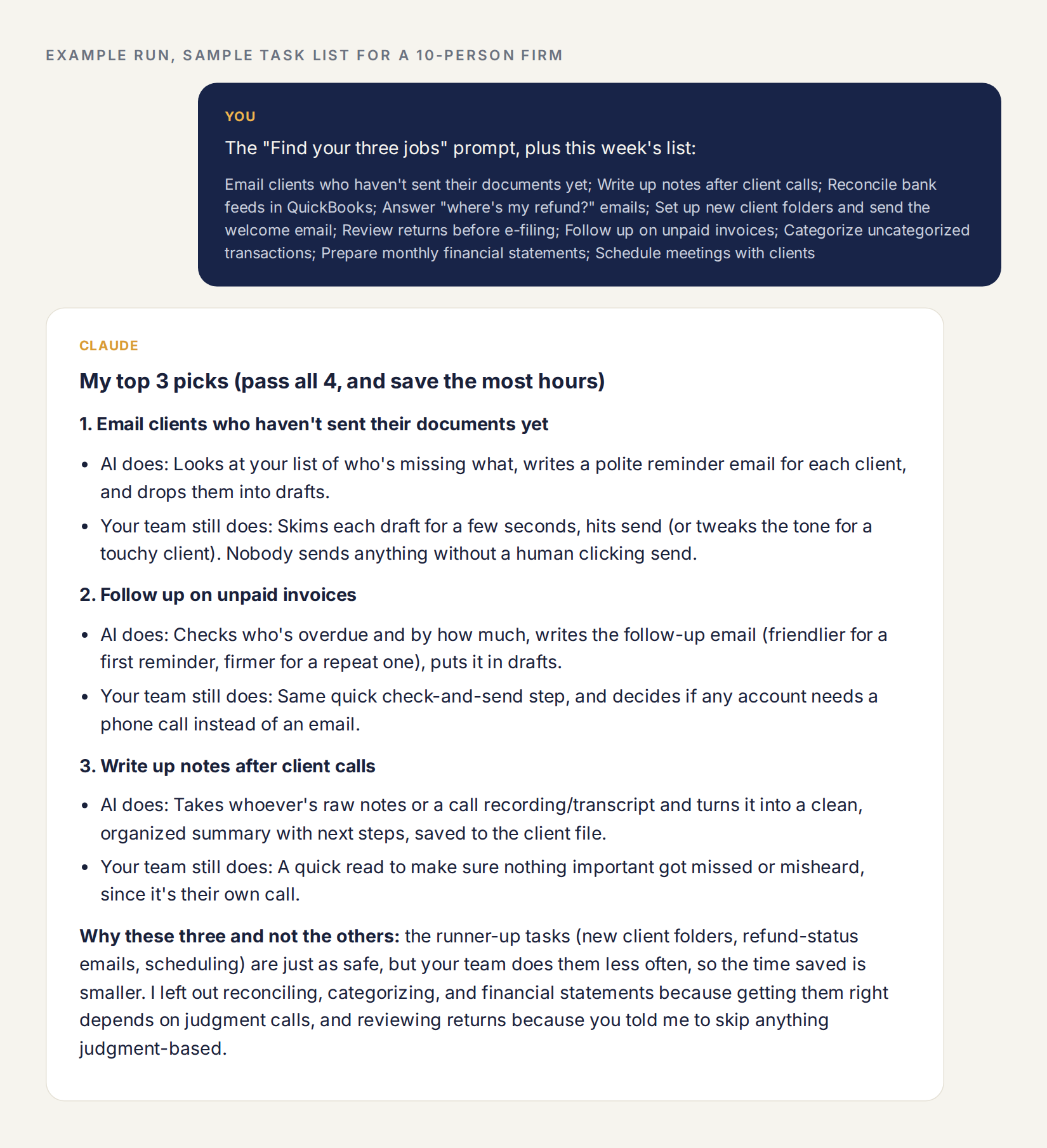
Here's what that looks like. I gave it a made-up list of ten tasks for a 10-person firm, the kind of stuff every firm does, and this is what came back.
Where it gets hard
Finding the three jobs is the easy part. Here's where firms get stuck:
- Writing the instructions. A vague ask gets vague work back. It takes a few rounds to get instructions that come back right every time.
- Client data. What's allowed in which tool, and what you need from the client first. Get this wrong and it's not a tech problem anymore, it's a compliance problem.
- Connecting it to your software. The big time savings show up when the AI can see your practice management system or your inbox, not when somebody's copying and pasting all day.
- Keeping it running in busy season. The week you need it most is the week nobody has time to fix it.
- Knowing when to quit on one. Some jobs look perfect on paper and fall apart in week two. Part of the skill is dropping those fast instead of forcing them.
We build and run AI systems every day, for our own company and for our clients. The setup around the AI is the part that eats the time.
If you'd rather not figure it out alone
That's the work we're building Bluhook to do for owners. It isn't open yet.
You don't need us to start, though. Find your three jobs this week. If you want to hear when we launch, leave your email below.
About the author

Robb Lejuwaan
Robb founded Bluhook and sets the standard for everything it ships. He went all in on agentic AI systems for business. Everything here is written from that work: the experiments, the mistakes, and the few things that held up.
Bluhook runs on its own team of AI employees every working day. Robb decides what's good enough to go out.
Own a small business? Get your AI score: 2 minutes, free.
For business owners
How ready is your business for AI? Get your AI score.
Take the 2-minute AI score and see how ready your business is. 11 questions. Free. Your score and the first place to start, right away.
Not ready yet? Get the next guide in your inbox.
Keep reading
More of what we are learning.
Or see everything we are learning.